YouTube videos Nutrition Program for NEA2

These are videos I made some years ago for workshops to show how to use the Nutrition Program

They are all useful for steps for NEA 2 and give you great Food and Nutrition GCSE results!

Note – some sites don’t like links to YouTube so copy the URL and post in Google.

How to carry out nutritional analysis of a recipe

How to make the recipe healthier

How to write the recipe method

How to find the portion size

How to cost a recipe

Nutrition Program for sensory analysis

My book Food Preparation Assessment Task NEA 2 will be available from mid September 2023

YouTube videos for Nutrition Program

These videos cover a range of topics on how to use the Nutrition Program – from the basics to some of the more advanced features.

How to put a recipe into the Nutrition Program

A start on how to use the Nutrition Program to create a recipe.

How to make a recipe healthier with Nutrition Program

Now you have put a recipe into the Program try and make it healthier.

Nutrition Program and Sensory Analysis

How to carry out evaluation of a dish you have tasted.

How to find the portion size

Video shows how to work out if the portion size is OK

Using the Star Profile for Food Investigation NEA 1

Shows how to draw a star profile when you have carried out tests.

Using a Star Profile for NEA 2 for a recipe – Chickpea Curry

Step by step on how to evaluate your recipe for GCSE

Costing a recipe using the Nutrition Program

Work out the cost of the ingredients and total recipe

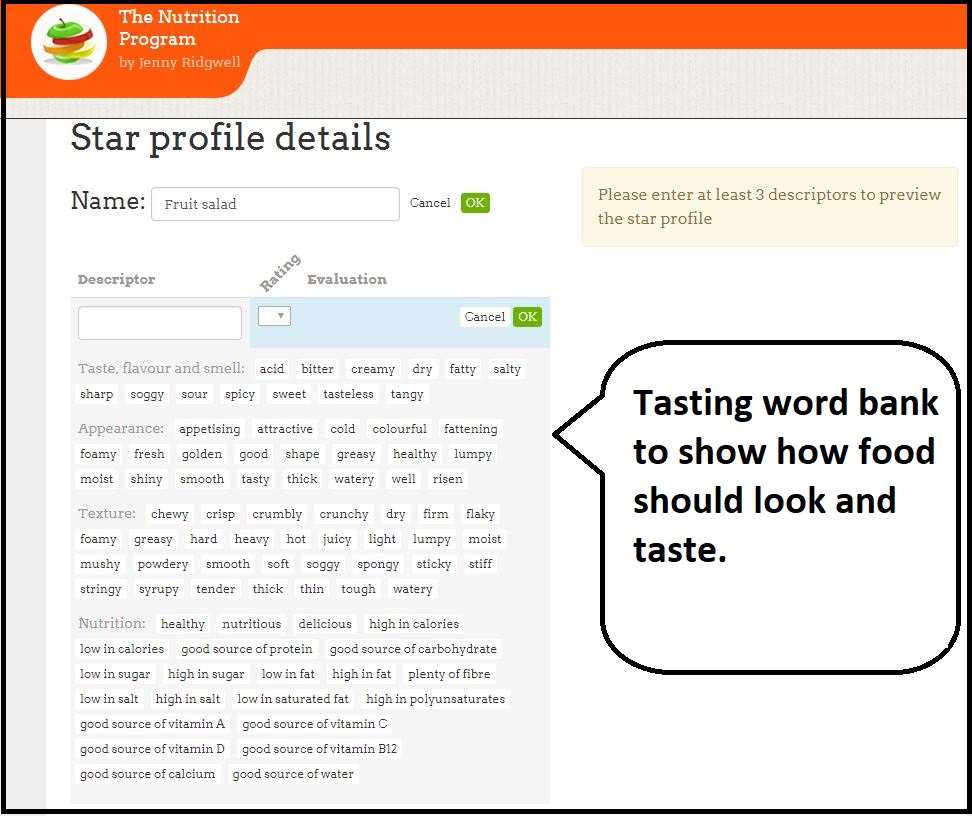
Tasting word bank

The Nutrition Program has a Tasting word bank which you can use for sensory evaluation for NEA 1 and NEA 2 and make a Star Profile.

Find words for

  • Taste, flavour and smell

    Tasting word bank in Nutrition Program

  • Appearance
  • Nutrition

Click the words you want to use and add them to Descriptors for your Recipe.

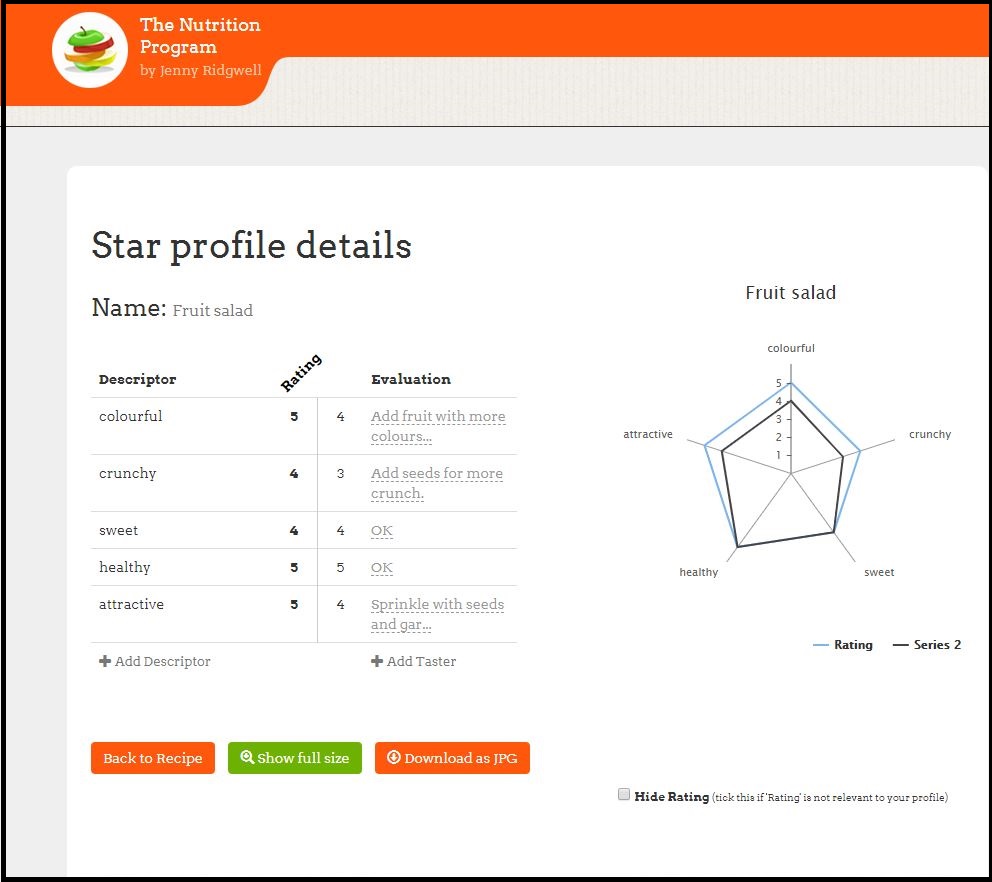
This example shows how to make a Star Profile for a Fruit salad.

Choose the tasting words – the sensory descriptors – you want to use and give them a Rating mark.

So Fruit salad should be

  • colourful 5/5
  • crunchy 4/5
  • sweet 4/5
  • healthy 5/5
  • attractive 5/5

The Nutrition Program draws the Star for you. Download as JPG

Now add a Taster (Jenny in this example) to taste your fruit salad and get them to score their results.

Now you can Evaluate the results of the fruit salad and see if it needs improving.

Just fill in the spaces for Evaluation.

Download the JPG to present in your work.

You can annotate the Star with more comments.

The final Star Profile compares the results of fats in pastry to see how they taste. You can add several types of pastry to the star to compare results and annotate.

Star profile fruit salad


Star profile with Evaluation filled in


Star profile with completed tasting and Evaluation.


Star Profile with annotation


Star profile for fats in pastry with evaluation


Star profile of fats in pastry with annotation.

This video shows how to do it

Sensory analysis video

Evaluate a food product for NEA 2

Samosas and cucumber chutney

I’ve made samosas with cucumber chutney – an example from OCR.

Samosa and cucumber chutney evaluation Comments
Good points about food productNice shapes, well cooked, tasty filling
Improvements neededSome samosas split open and baking was uneven.
Sensory words – descriptorsEasy to hold, spicy, golden, tasty and crisp pastry.

Fill in a chart like the one above.

Then decide on the Sensory Tasting words to use – Descriptors

I’ve chosen – easy to hold, spicy, golden, tasty and crisp pastry.

For the best samosa result that I want, I give each descriptor a mark out of 5.

easy to hold5/5
spicy4/5
golden4/5
tasty5/5
crisp pastry5/5

Open the Star Profile in the Nutrition Program to evaluate your results.

Put these marks in the Rating column.

Get 2 or 3 people to taste your samosas and give a mark for each descriptor. Put their name on +Add Taster – the first one is Jenny – that’s me!

My tasters are called Jenny, Ali and Mosha. Enter their marks.

Complete the Evaluations for each Descriptor. Think about the marks the tasters have given.

Export as a jpeg.

You can put this image into your work. The Evaluations on the left show your comments. My samosas need a little more baking and more flavour with some spices.

All done!

This video shows how to make a Star Profile.

Using the Nutrition Program for NEA 2

My resource for Food Preparation Assessment Task NEA 2 will be available as download mid September.

This shows how the Nutrition Program cab be used for different sections of the Tasks.

If you are a Nutrition Program subscriber, email us for a free copy.

key words NEA 2

Key words used in NEA 2

The chart shows key phrases from exam boards for NEA 2 where The Nutrition Program can be used.

  • The exam boards have similar points to cover
  • Research to find dishes that fit the task –
  • Explain how the dishes meet nutritional needs
  • Look at Traffic Lights,
  • Reference Intake RI, and if they fit with a meal.
  • Look at sensory properties – use The Nutrition Program to draw up a Star Profile.
  • Carry out nutritional analysis of dishes – produce a food label using Nutrition Program
  • Portion control – see our worksheet for the Nutrition Program
  • Analyse the nutrition – annotate the food label.
  • Carry out sensory analysis and add tasters, then write evaluation – all done through Nutrition Program.
  • Use sensory descriptors – the Nutrition Program has a Tasting Word Bank
  • Cost the dish – the Nutrition Program has costs of ingredients
  • Conclude and think of improvements.

There are Step by Step links to each section of NEA2